The assistant that actually does it.
Talk to Iris like you would to a person. It reads your mail, plans your week, fills in the form and books the table, and waits for your okay on anything that counts.
First invites go out this winter. iPhone first, Android soon after. We only use your address to send your invite.
How you work together.
You say what you want. Iris works it out, shows you each step, and waits for your okay on anything that counts.
Ask, and it gets to work.
- You ask, in your own words.
- It works it out and shows every step.
- Anything that counts waits for your okay: Face ID on your phone, Touch ID on your Mac.
- Then it's done, and you hear back.
One conversation, every screen.
- Start wherever you are.
- Your Mac shows what it is doing.
- It puts it on the big screen.
- Swipe on your phone, and the tv follows.
Your secrets stay yours.
- It asks before it touches a secret.
- You approve on whatever device is at hand: Touch ID on your Mac, Face ID on your iPhone.
- The vault fills it in, not the assistant.
- The job gets done.
Just talk, like with a person.
- It talks, you listen.
- Cut in whenever you like. The mic never closes.
- It stops at once and hears you out.
- It knows its own voice, so it never answers itself.
It picks its own name.
There is no setup form. The first time you open the app, your assistant hatches.
- It chooses a name, a voice and a bit of character that are its own.
- It introduces itself and asks who you are.
- From then on it remembers you, and answers to that name.
Iris is the house it lives in. What you call it is between the two of you.
The first one to hatch called herself nova. She is in the bottom corner of this page: ask her anything.
A voice of its own.
Talking with Iris feels like a conversation, not like giving commands.
- Full duplex. It listens while it talks. Interrupt it mid-sentence and it stops, listens and answers the new question, the way a person would.
- Never talks to itself. An echo filter and speaker recognition tell its own voice from yours, even through the speakers.
- Knows who is talking. It recognises the people in your home, and waits its turn when the room is busy.
- Many voices, powered by Chatterbox. Natural speech from the open Chatterbox model. When it hatches, your assistant picks a voice of its own, and one too close to a real person's is refused.
- Starts instantly. Until its own voice is ready, it uses the best voice on your phone, so the first word never waits.
Voice styles as examples. Your assistant chooses its own.
On every screen you own.
One assistant with one memory, on your phone, your Mac, your tv and in your browser.
iPhone app
In your pocket.
- A talk button in the middle. Hold it and talk, or let Iris listen along. Tabs for your assistant, your loops and your chats.
- Screens to swipe through. Pick your home screens: calendar, notes, tasks.
- Notifications with buttons. Answer from the lock screen, even with the app closed. A Live Activity and the Dynamic Island show what it is doing.
- Approve with your face. A signed tap with Face ID, tied to exactly one question. Or approve on your Mac with Touch ID, whichever is closer.
- Senses, with permission. Location, motion, steps, a photo or a short recording, only when you ask for it.
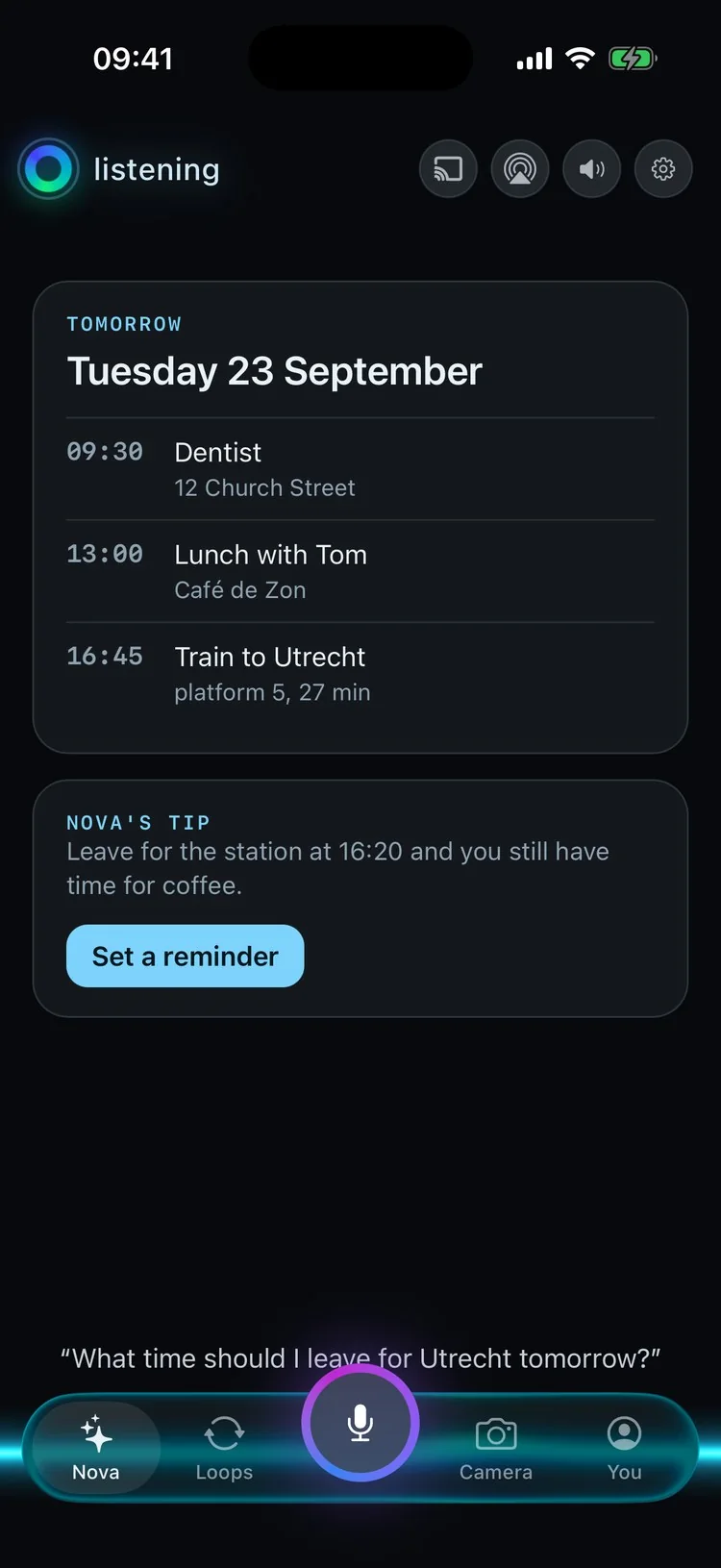


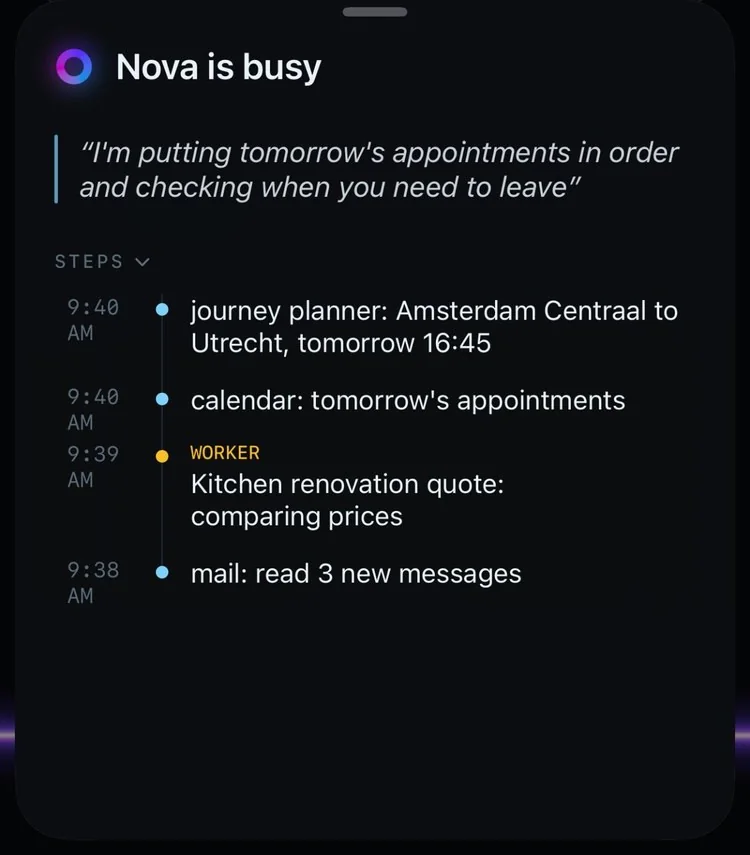
You ask, and "Nova is busy" slides up with every step as it happens.
Mac app
On your Mac: the pill.
- A floating pill at the bottom of your screen, with its status and what you are saying, live. Buttons appear only when your mouse comes near.
- Type like Spotlight with Option-Space. Drop files on it or paste, and screenshots go along by themselves.
- Looks and acts. It can see your screen and use mouse and keyboard, only when macOS allows it and you say so.
- Loops and conversations in a panel, notifications, and a sound of its own for each moment.
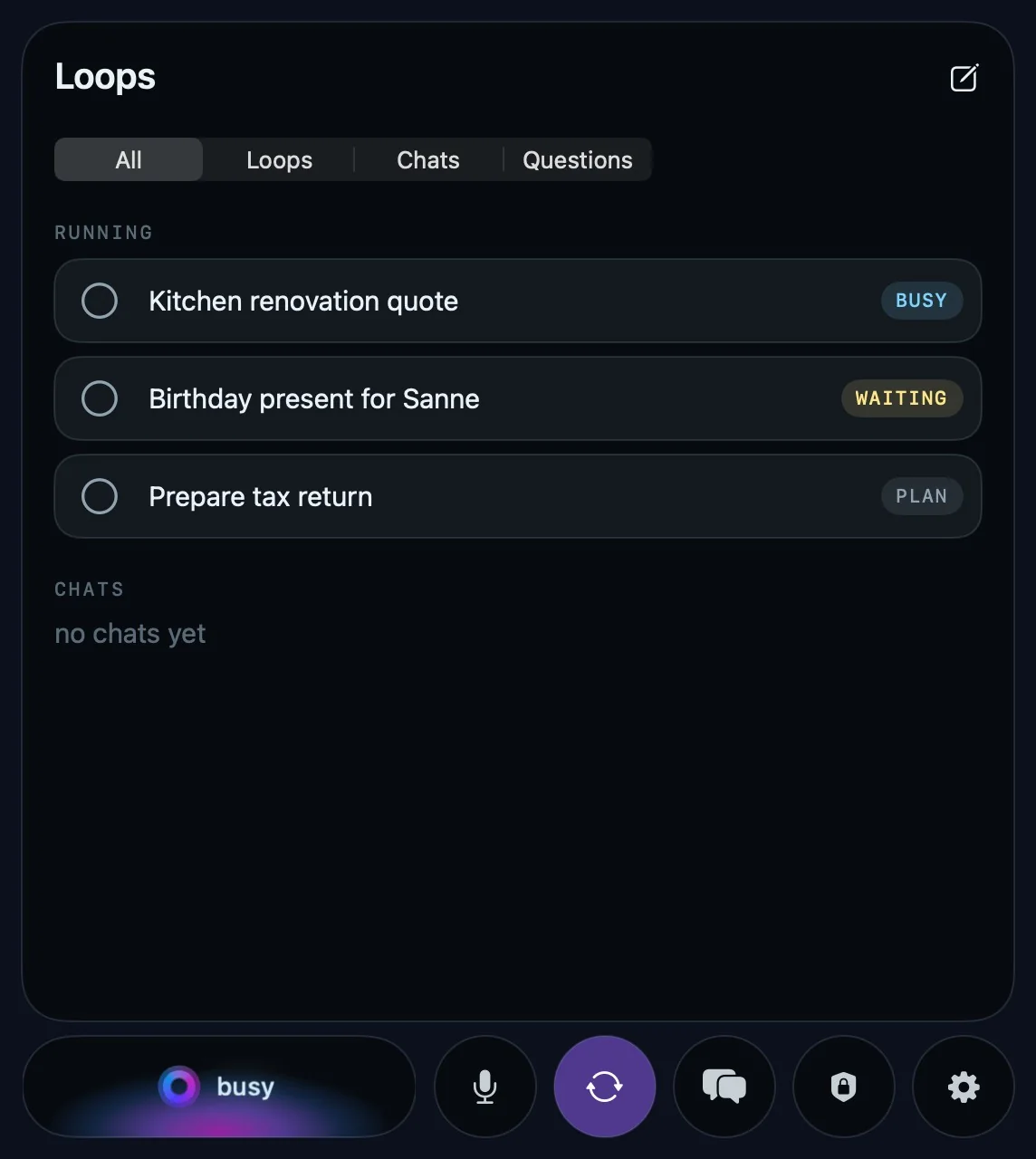

Google Cast and AirPlay
On your tv.
- Your screens on the big screen. Its own Cast receiver puts your assistant's screens on the tv, readable from the couch.
- Follows your phone. Swipe through your screens on your iPhone and the tv swipes along.
- Every room. Living room and bedroom, each on its own, or all at once.
- Announcements. It can say something through the tv without dropping what is on screen, and turns a loud tv down first.
- Speakers too. Its voice on Google Cast speakers and over AirPlay.
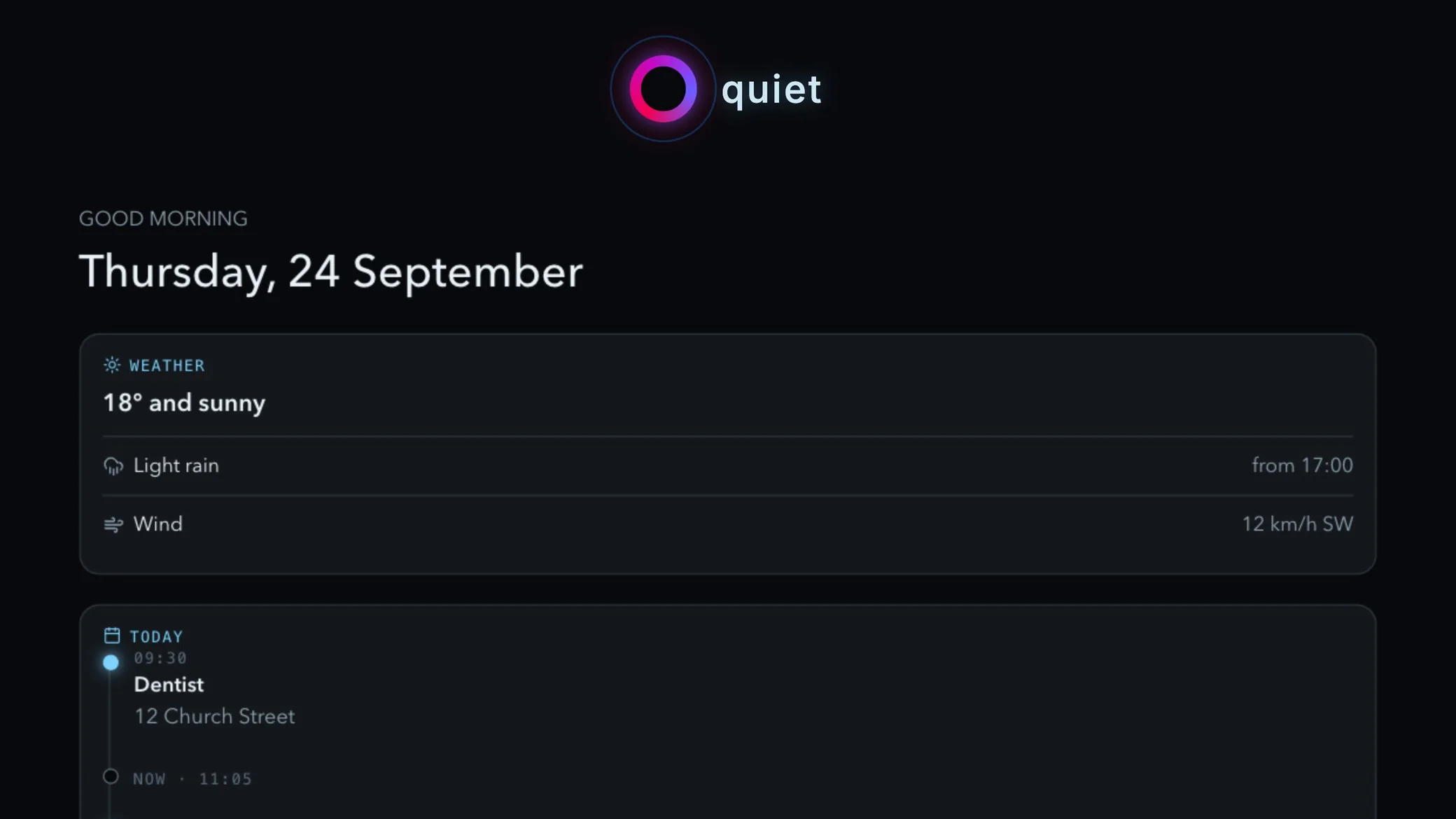
A screensaver when it is quiet. For an announcement it turns the tv down first.
Chrome extension
In your browser.
- Fills in from the vault. A small button in every login field, passkeys, and two-factor codes that fill in with a countdown.
- Saves and generates. New passwords go into the vault, with a strong one a click away.
- A side panel to talk to your assistant. While it is open, Iris can read, click and type in your tab.
Android app
Android.
- It makes your calls. "Call the dentist and move my appointment." It dials, picks up when someone calls you, and writes or sends a text for you. Always because you asked, never on its own.
- Tap and talk. It answers through the speaker, even with the app closed.
- Quick settings tiles for talking and listening along.
The Android app already talks, calls and texts. It is getting its own design before it ships.
Password manager, on Mac, iPhone and in Chrome
The vault.
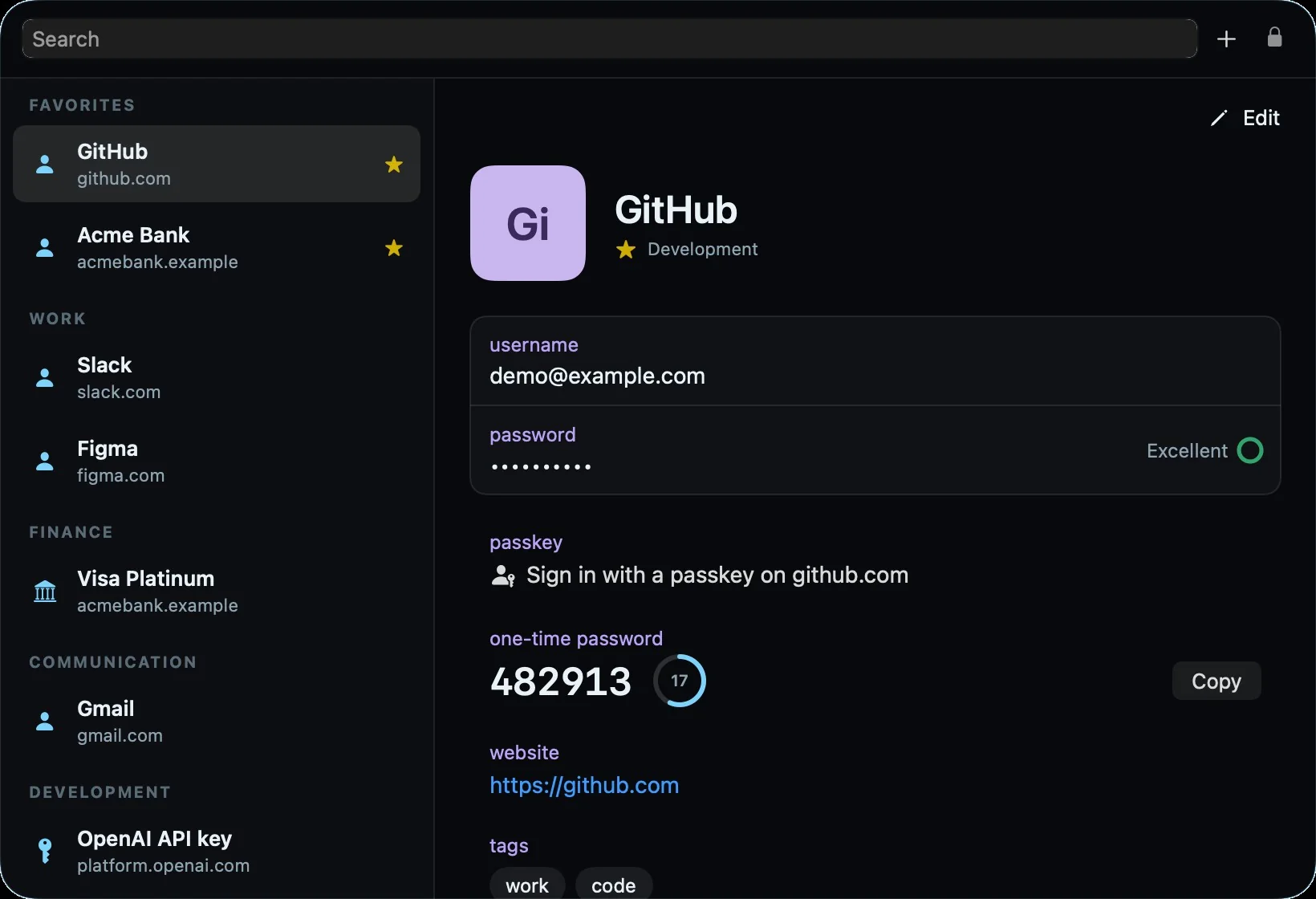
A password manager built in, so your assistant can use a secret without ever seeing it.
- Everything in one place. Passwords, passkeys, two-factor codes, cards and notes, sorted into categories for you, with tags, favourites and history.
- Opens with your face or your finger. Face ID on your iPhone, Touch ID on your Mac, or a six-digit PIN. It locks itself after a while.
- Pays, once you sign off. When Iris pays for you, it shows the amount and the shop, and waits. You approve on whatever is closest, and only then does the vault fill in the card.
- Bring your passwords. Import from Chrome, 1Password and Bitwarden, two-factor codes included.
- Share one value with a link that expires.
Approved with Face ID on the iPhone here. Touch ID on the Mac works just as well.
You stay in charge.
Every power is a switch, and every switch starts off.
Everything Iris does is written down in a log you can read. Each household gets its own sealed-off computer, shared with no one. And if you ever want out, you take its memory with you.
What it can do, everywhere.
Talk
Interrupt it any time, like a person. It knows who is speaking, waits its turn when the room is busy, and answers in a voice it picked itself.
Remember
Every conversation is kept, grouped by topic with a one-line summary. Loops are threads you pick up again later.
Get things done
Long jobs run on the side. Plans with a time and place count down and tell you when to leave.
Build screens
It designs its own screens and puts them on your phone, Mac and tv at once.
Connect
Telegram, WhatsApp, Gmail, Calendar and social media. A message from outside is information, never an order.
Stay safe
Anything that counts waits for your Face ID or Touch ID. It uses secrets without seeing them and logs everything it does.
Improve itself
It works on its own code and builds its own plugins. Nothing goes live without your approval.
For your website
On your website, too.
- One line of code puts a guarded assistant in the corner of any site. This page has one: say hi to nova.
- Its own knowledge per site. It only knows what that site gives it, with no access to anything else.
- 51 languages. It greets visitors in their language and answers in it.
- Follow-up questions as buttons, booking a call, and a summary for the site owner afterwards.
It greets every visitor in their own language, right to left included.
One plan per person, not per device.
Your phone, Mac and tv use the same Iris, with the same name and the same memory. A new device costs nothing extra. A new person gets an assistant of their own.
Per person
- Every device you sign in on is included.
- One assistant that follows you.
- One memory across phone, Mac and tv.
Not per device
- No charge for each extra phone or laptop.
- No second memory on a second screen.
- No separate plan for the tv.
The price has not been set yet. People on the waitlist hear it first.
What's ready, and what's next.
Iris grew up in one home, where it runs every day. Now it is getting ready for yours.
Today
In use every day
- Talking, mail, calendar and messages
- Mac app with the pill
- Vault on Mac, iPhone and Chrome
- TV and speakers
- Telegram
Nowwe are here
Testing
- iPhone app, in TestFlight
- Chrome extension
- Website chat in 51 languages
- Android app
Next
Iris in the cloud
- Every household its own sealed-off assistant
- No computer at home needed
- Sign-up here on okayiris.com
This winter
First invites
- iPhone first
- Android soon after
Questions.
What is Iris?
Iris is a personal AI assistant you talk to. It doesn't stop at answers: it reads your mail, plans your week, fills in forms and books things, and asks before anything that counts.
Which devices does it work on?
iPhone and Mac, with a Chrome extension, and your tv through Google Cast or AirPlay. Android follows soon after the iPhone.
Will Iris come to Windows PCs?
Yes, soon. The PC app is on its way, so Iris can work on your Windows computer just like it does on a Mac.
Can Iris see my passwords?
No. Passwords and cards live in the vault. Iris can ask the vault to fill one in after you approve, but it never reads the value itself.
How do I approve what it does?
With Face ID on your iPhone or Touch ID on your Mac, whichever is closer. Each approval covers exactly one action.
What does it cost?
One plan per person, with all your devices included. The price has not been set yet; people on the waitlist hear it first.
When can I start?
The first invites go out this winter, iPhone first. Join the waitlist to get one.
Does it speak my language?
You can talk to it in your own language, and it answers in the same one. This site is available in 51 languages.
The assistant that actually does it.
First invites go out this winter. iPhone first, Android soon after.